V. After You Launch
SEO Basics
Search Engine Optimization is something that many product people ignore for far too long. But as you’re going to see, there’s nothing stronger than intent-based searches.
When someone has a struggle, question, or a problem, where do they go? They go to Google to look for an answer.
If your product is near the top of search results for those keywords you have a good chance of getting a customer. The person searching is intrinsically incentivized to solve their problem.
SEO is different from content marketing or posting on Product Hunt. On those sites, people are browsing recreationally. They’re not looking for a solution.
In this chapter, I’ll be using www.Roadmap.space, a product management tool, as an example. They help software companies generate public roadmaps.
Case study: Roadmap
My first step with Roadmap is to figure out how much organic search they’re already getting. Specifically, which keywords are people using to find them?
The best place to find this information is in Google’s Search Console (Webmaster Tools).
In the Search Console menu, go to:
- Search Traffic
- Search Analytics
Here, we’re able to see how many clicks Roadmap has received for different queries on Google search.
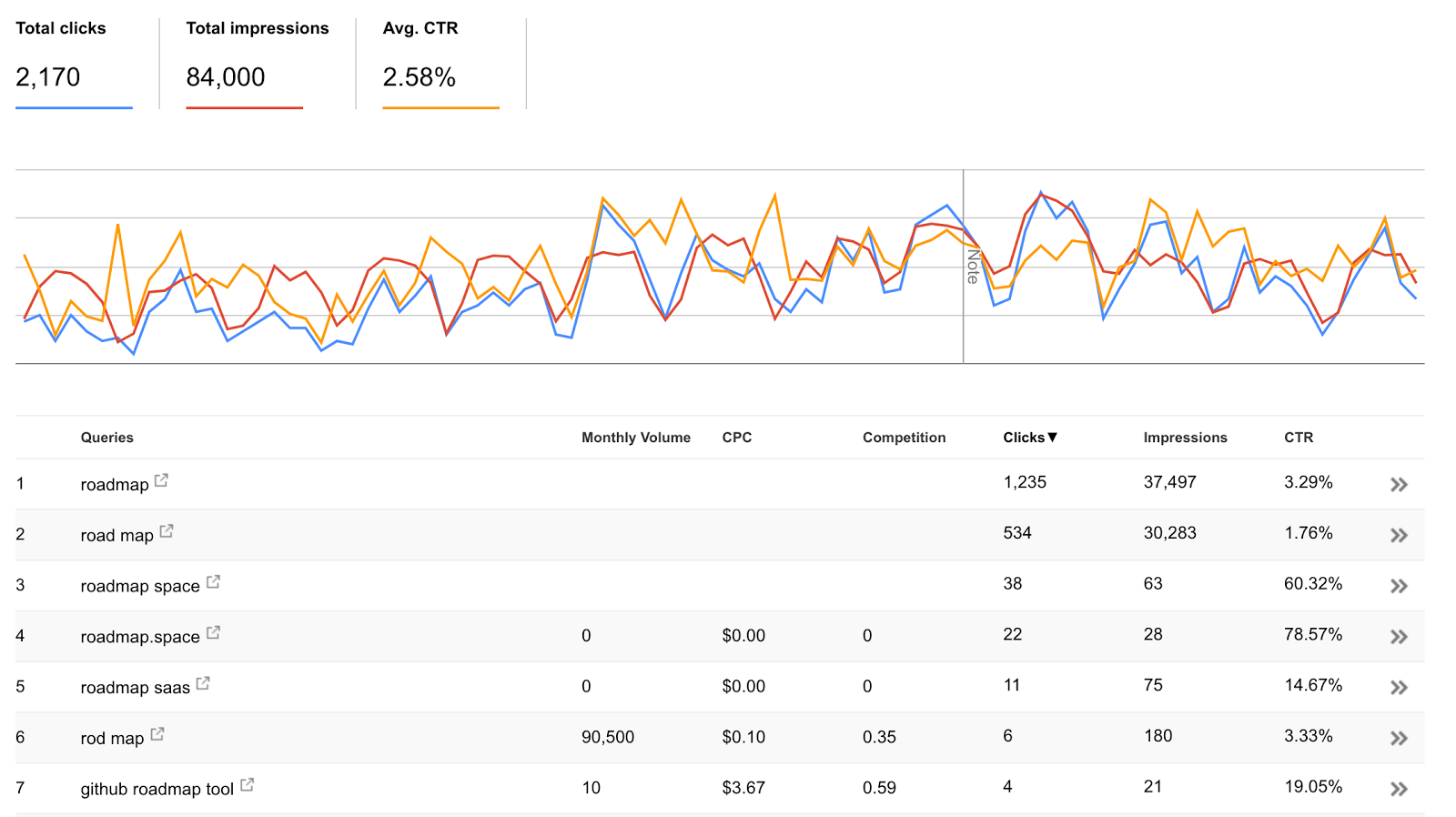
The first thing I do on this screen (especially for startups) is I change the date range to 90 days.
Next, I’ll take a look at which search terms generate the most clicks to their website. Roadmap is getting most of their clicks from the keyword “roadmap.”
Besides Clicks, we also want to look at the number of Impressions a search term is getting, and the click-through rates.
One potential challenge with the word “roadmap” is that some folks are using that keyword to get a map with driving directions (as opposed to a product roadmap).
So let’s see what Google is returning when we search “roadmap.”
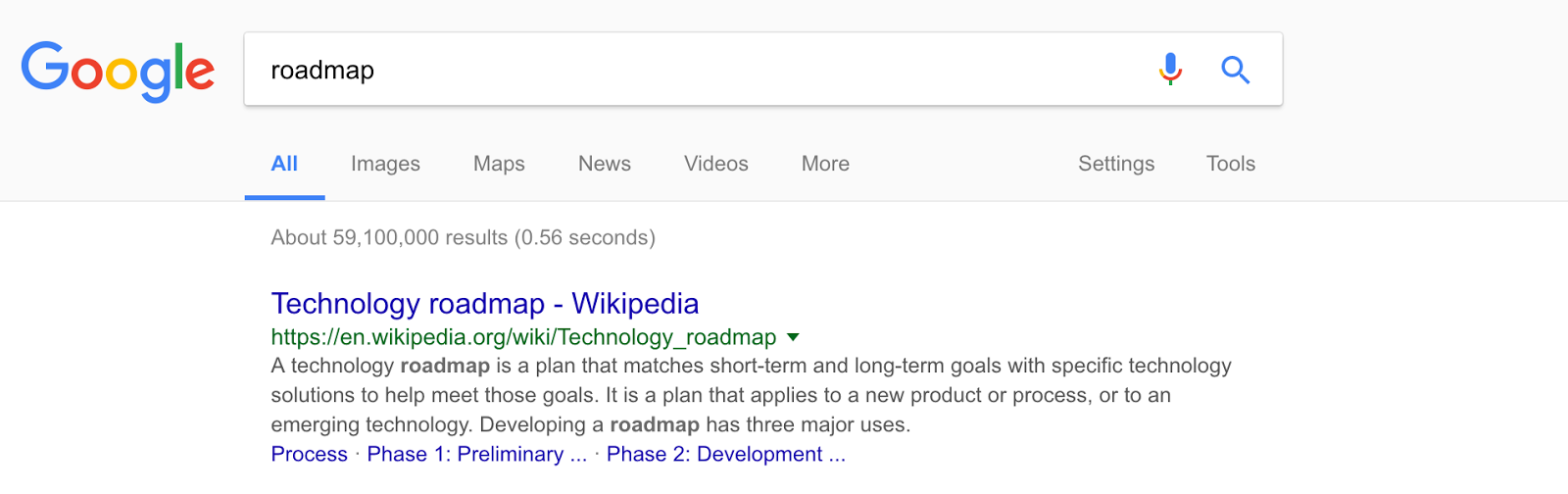
The results are encouraging: a Wikipedia article on “technology roadmap” is the first result.
We’re also getting a sense of what Google thinks is important. They’re highlighting questions like: “what is on a road map?” and “what is a product roadmap in Agile development?”
Additionally, we can see which products are ranking highly for that term. There’s one called ppmroadmap.com, and another called wrike.com.
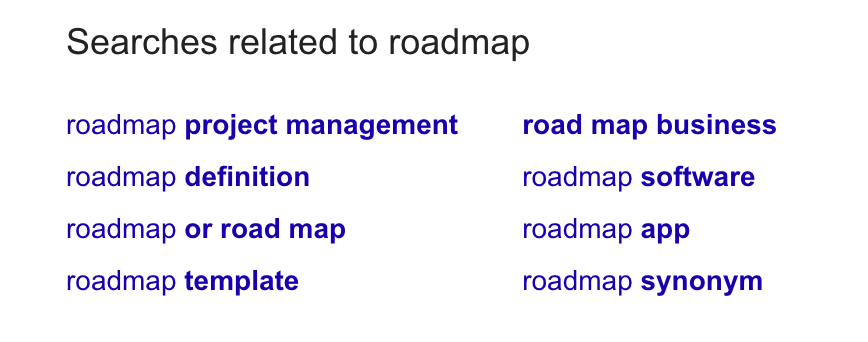
Finally, there are the “searches related to” our keyword (roadmap). Here we see keyword combinations like “roadmap template,” “roadmap project management,” and “roadmap app.”
By default, Google personalizes your search results based on your location and your Google account information. You can depersonalize your search results by adding this string &pws=0&gl=us to your query.
For example:
google.com/search?q=roadmap**&pws=0&gl=us**
Here’s how it works:
- &pws=0 – removes any personalized search results.
- &gl=us – changes my region to the USA.
The next tool we’re going to use is called WooRank. It generates an SEO report that looks like this:
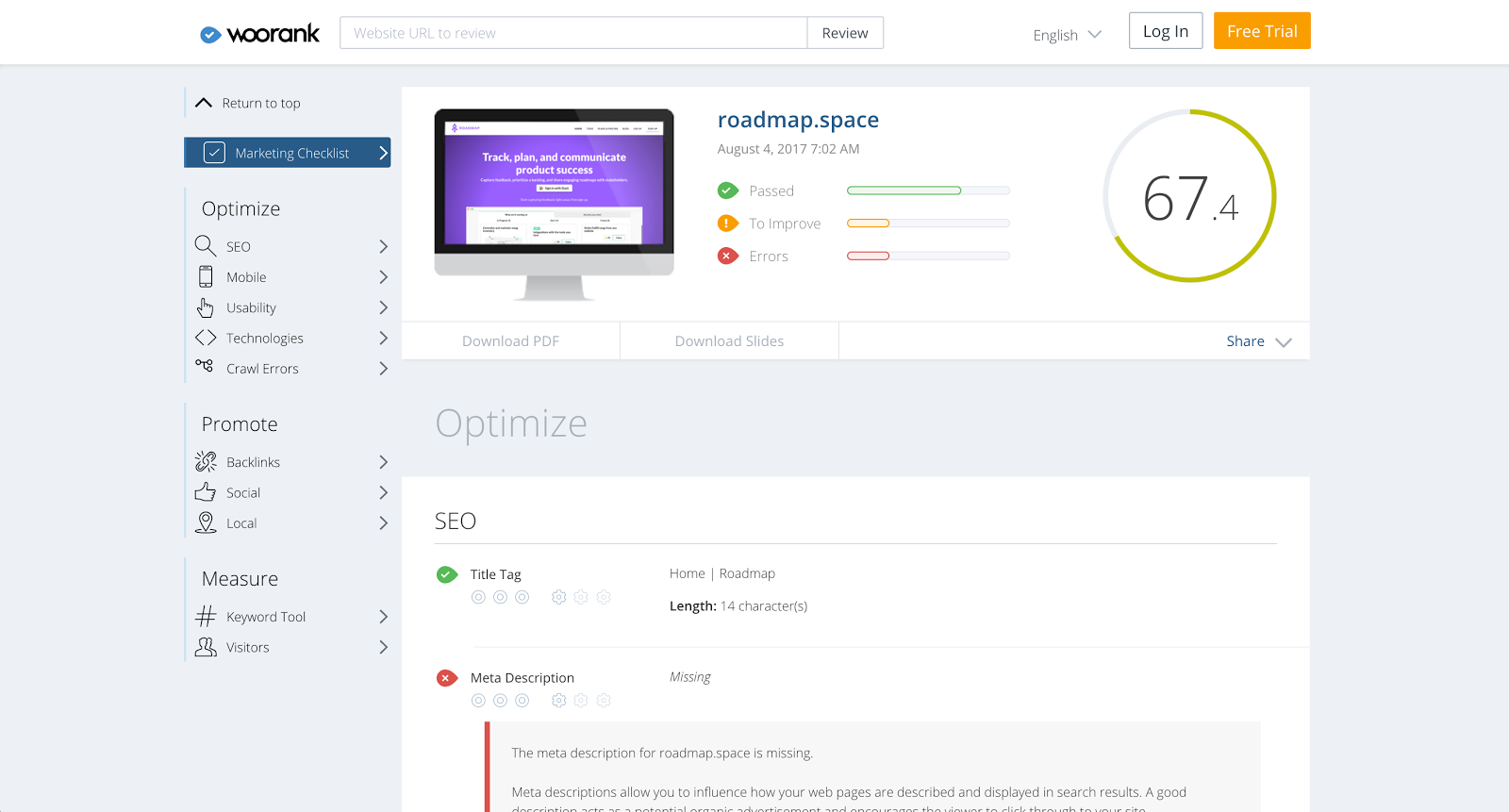
It highlights some opportunities for things we could fix:
- The title tag currently says “Home | Roadmap” and isn’t optimized for search. For example, we could change that to “Product Roadmaps for Startups.”
- The site is also missing a meta description.
- The headings (h1, h2, h3) don’t describe the product or use focus keywords.
- In the keyword cloud, we can see the word “roadmap” comes up the most frequently. However, the next most mentioned terms are “feedback,” “users,” and “pricing.” We can improve this!
The research we’ve done here is important. It gives us a feel for where Roadmap is now and where they need to go. Now we can see the SEO opportunities.
Finding keywords for your website
I want you to imagine that you’re a startup founder talking to your VP of customer success, just chatting, and he mentions that users want to see your product roadmap. They have questions about which features you’re going to release next, and because there’s no public place for them to view that information, it increases the load on your support staff.
As a founder, what will you do? What’s your first step to solving this problem?
If you’re like most people, you’ll go to Google to search “public product roadmap” and get a long list of search results. As a busy CEO, you’re highly incentivized to pay for something that’s going to save you time and money. You try out a few options, maybe two or three, and finds one that you like. Then, you’ll take out your credit card and buy. If the product does its job and makes the support staff happy, you’ll feel like it was a good purchase. You’ll feel like you’ve made progress.
That’s how most sales happen on the web.
Let’s go back to our case study, Roadmap. In the last section, we identified some key opportunities. Using WooRank and Google’s Search Console, we saw what people are already searching and what the click-through rate was.
ahrefs.com
Now we need to figure out what keywords we should target (and fix problems with the title tag, meta description, headings). I’m going to start by using a tool called ahrefs.com. Here’s what the process is going to look like:
- Type in your website. In our case, this is roadmap.space.
- We need to start thinking about which keywords we want. Things like “roadmap” and “product roadmap” and “public product roadmap.” Then we can look at their suggestions to get some more keywords like “slack roadmap.” Also, make sure to spell things correctly.
- We have to enter in some countries. In our case, all we need to choose is “United States.”
- We need to add some competitors. For us, this will be Trello, User Voice, ProdPlan, and maybe Roadmap Planner.
- Submit to receive the report.
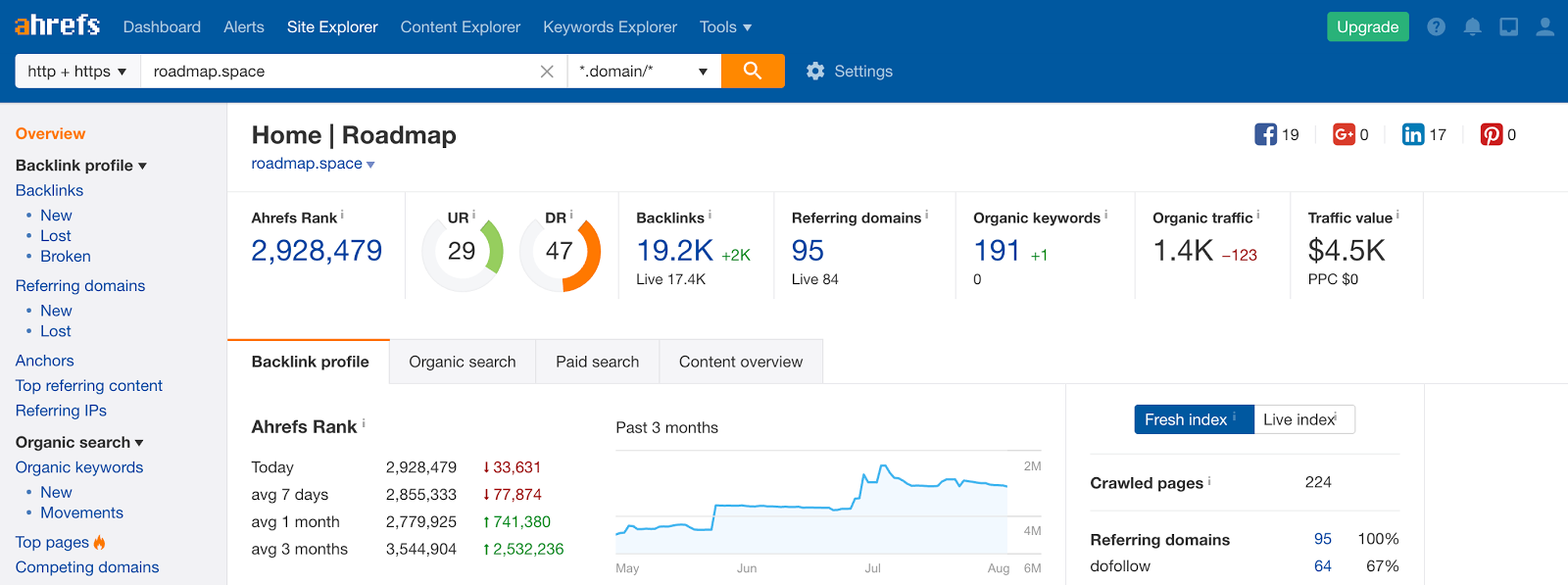
There’s a lot to show you here; here are a few highlights.
First, is going to be competing domains. These are the domains of your competitors. We can open the data on any of the competitors to look at their organic keywords.
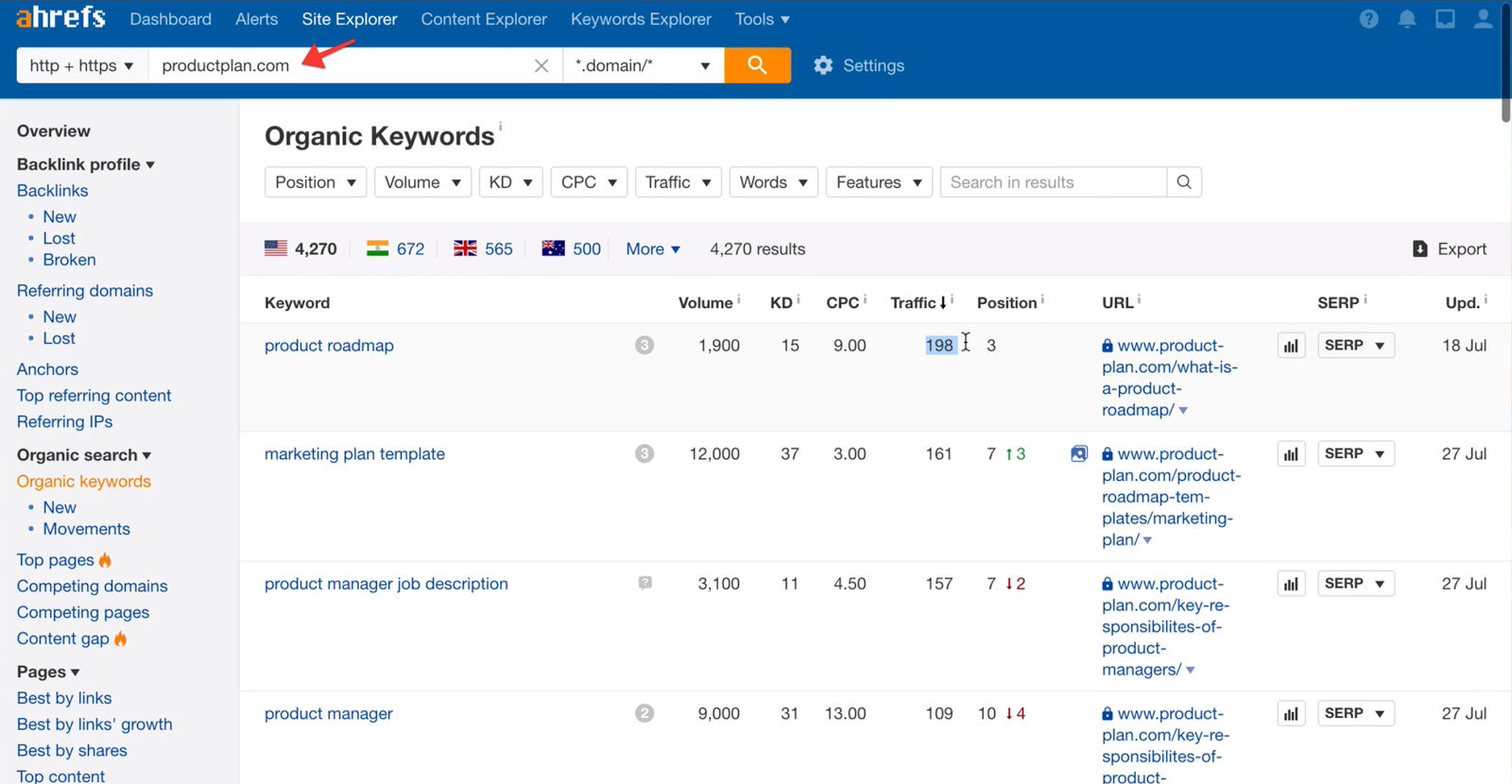
We can see that productplan.com is number three for “product roadmap” and getting a fair amount of traffic for it. As we dig a little deeper, we find that search volume and clicks are increasing for that keyword.
In this case, the keyword difficulty for “product roadmap” is low. This is good news! It means we’ll likely need backlinks from about six websites to rank in the top ten for this term.
When we look at backlinks for Roadmap, we can see most of their referrals are coming from Designer News and Product Hunt.
But if we look at the backlinks for productplan.com, we know they have way more backlinks from sites like the Buffer blog, Forbes, Medium, Entrepreneur.com, as well the UK government. It’s becoming apparent why productplan.com is number three for “product roadmap.”
ahrefs.com also gives us some search suggestions for other keywords we might want to target, like “product roadmap template” and “product roadmap software.” Remember, you can also see those kinds of suggestions if you just search for your keyword and go to the bottom of the first page (“searches related to”).
Ahrefs also suggests other search terms, like “product strategy” or “definition of product.” I like to take these suggestions and put them into a text file called “keyword ideas.”
Answer the Public
Answer the Public is another helpful tool for browsing words and coming up with keyword suggestions. When I type in “product roadmap” I get a visualization like this:
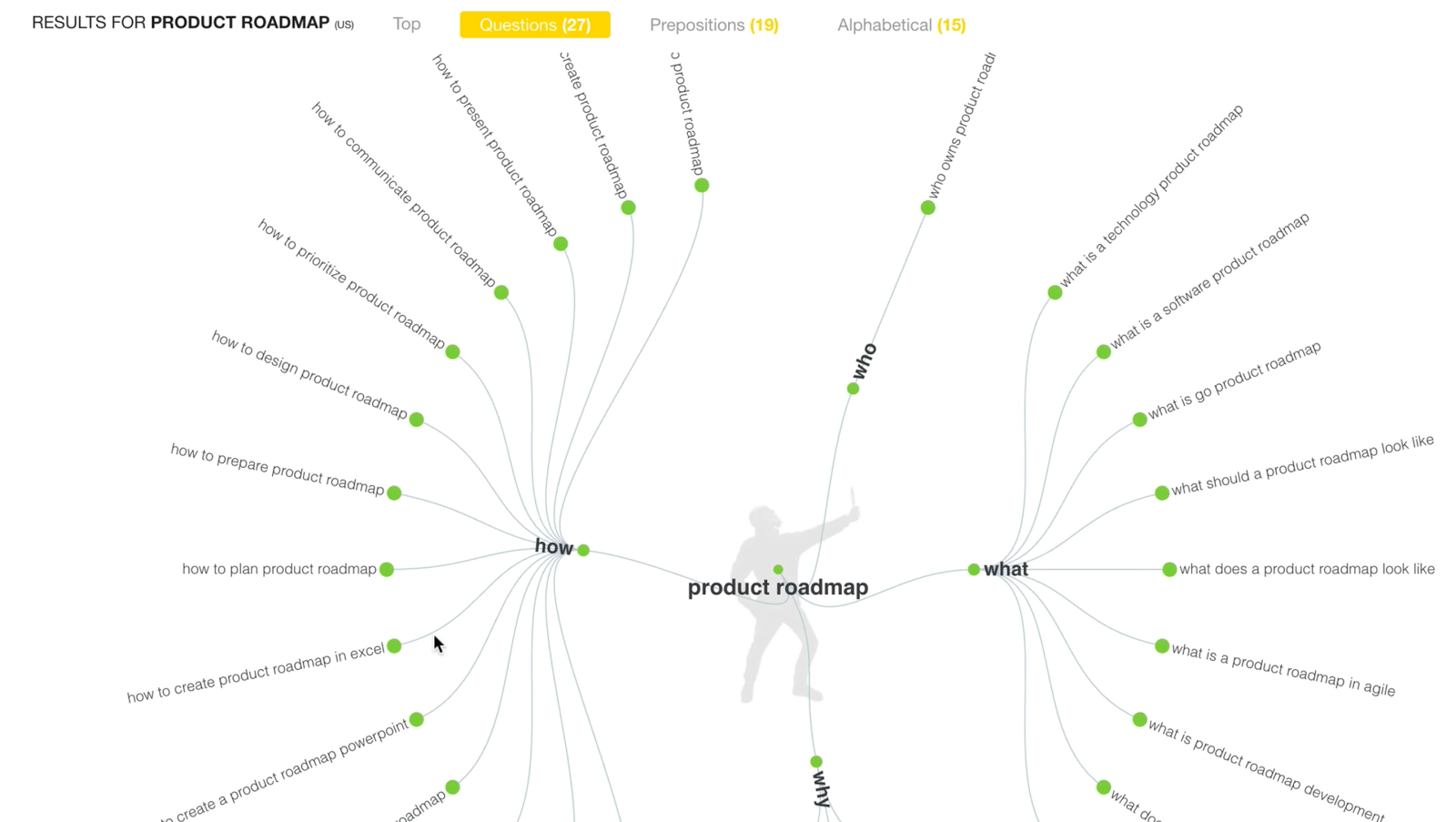
What I like about this is it visualizes the main keyword, but then shows you all the questions people are asking about the topic. For example, “Who owns the product roadmap?” or “What is a technology roadmap?” or “What is a software product roadmap?” You can click on any of these, and it will take you to that actual search, where you can see who’s ranking and what content Google is scraping.
If we scroll down to the Prepositions section, we get even more ideas. Things like:
- “roadmap for products”
- “roadmap for product launch”
- “roadmap for product development”
- “product roadmap how to”
- “product roadmap with JIRA”
- “product roadmap with Trello.”
All of these keywords are ideas we can add to our “keyword ideas” text file.
Google Trends
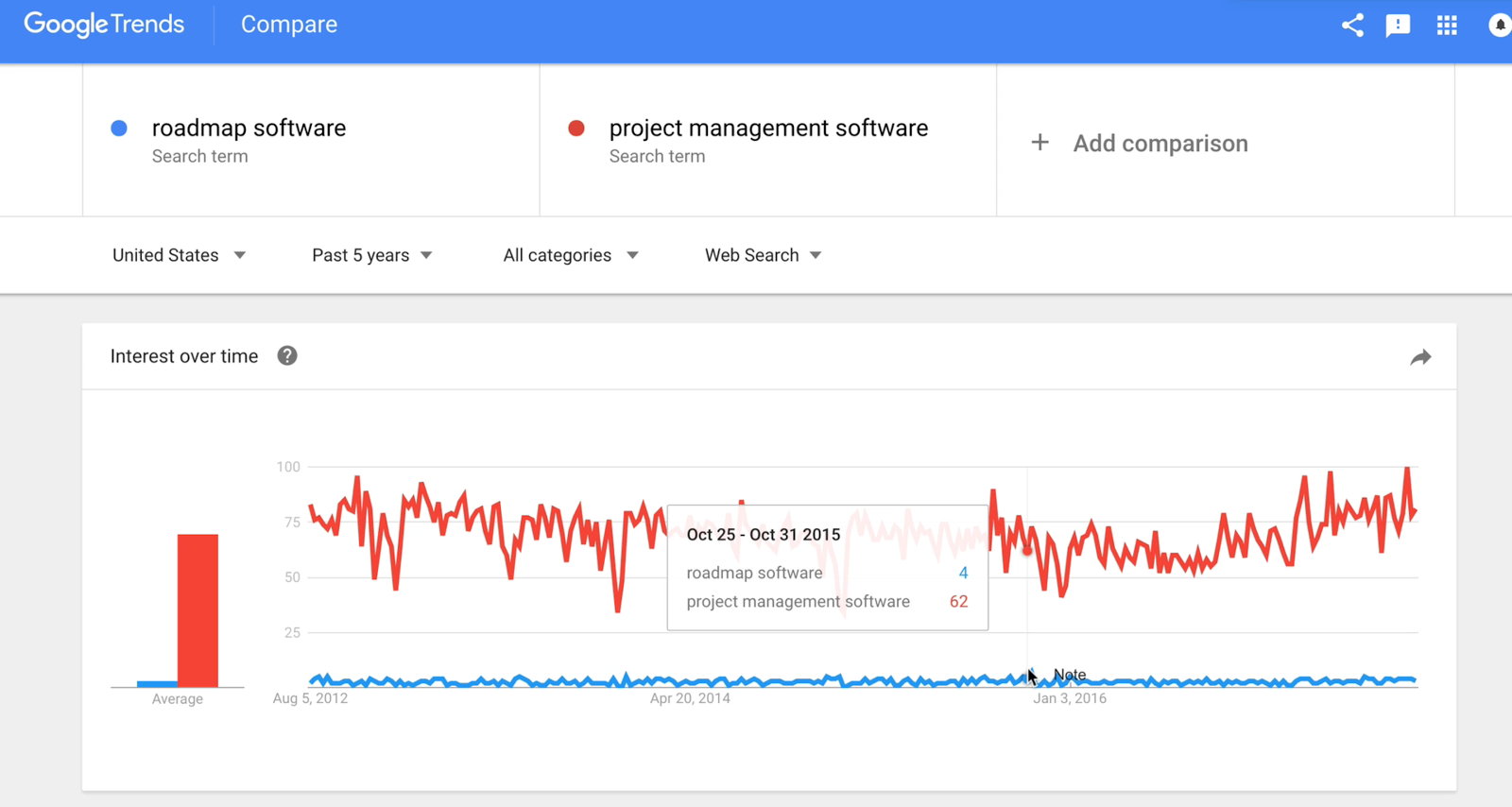
I want to show you one more tool that can be helpful in this whole process. Google Trends shows you relative search interest for different keywords. For example, if we put in the term “roadmap software” it would plot the interest over time. We can now compare this keyword to other queries to gain insights:
- There is more interest in “project management” than “roadmap.”
- The term “project management software” is much more popular than “roadmap software.”
Fix your website’s SEO problems
Next, let’s look at editing our homepage page content so we can target the keywords we just discovered.
Title
The first thing we need to fix is the title tag. The title tag says “Home” and then “Roadmap,” and doesn’t tell people anything about the product.
Going back to our keyword planner, we can see that “product roadmap” is a high-interest keyword, so that’s what we’re going to add. I’m going to change the title to “Product roadmap software.”
Meta Description
The meta description is a summary of your web page’s content. It should be shorter than 160 characters. For Roadmap’s meta description I wrote: “product roadmap software and tools for startups.” I also identified some meta keywords: “roadmap,” “roadmap software,” and “roadmap tools.”

Content Optimization
Next, let’s edit the homepage’s text. When you optimize your content for search engines you get an added advantage: it also makes the page more readable.
1. Headline
I’m going to change the current headline of “planning software for startups” to “product roadmap software.”
2. Sub-Headline
For the sub-headline, we might say something like, “tools for product managers, founders, and software teams.”
3. Section Headlines
As we scroll down, we might find some other titles. Search engines pay particular attention to H1, H2, and H3 tags, so we may want to add keywords in there, such as “Roadmap features.”
4. Alt Text
Defining the “alt text” tags for your images is also important for SEO. The alt tag was designed to show text when an image is not loading correctly, or if someone is using a screen reader. Google indexes alt text, so put relevant keywords in these descriptions!
Review
After finishing homepage edits, I like to look at my list of keywords again to make sure I used them all.
These little content tweaks on your homepage (and other pages) should gradually improve your search results over time.
SEO for Wordpress
If you want to make your SEO activities simpler, I recommend you use a WordPress plugin called Yoast. There are a few reasons I recommend this.
1. It helps optimize your focus keyword
What’s a focus keyword? Yoast describes it like this:
The focus keyword is the keyword that you want your page to rank for, so when people search for that keyword, they’ll find you.
In Yoast, you enter in the focus keyword, and it analyzes your content.
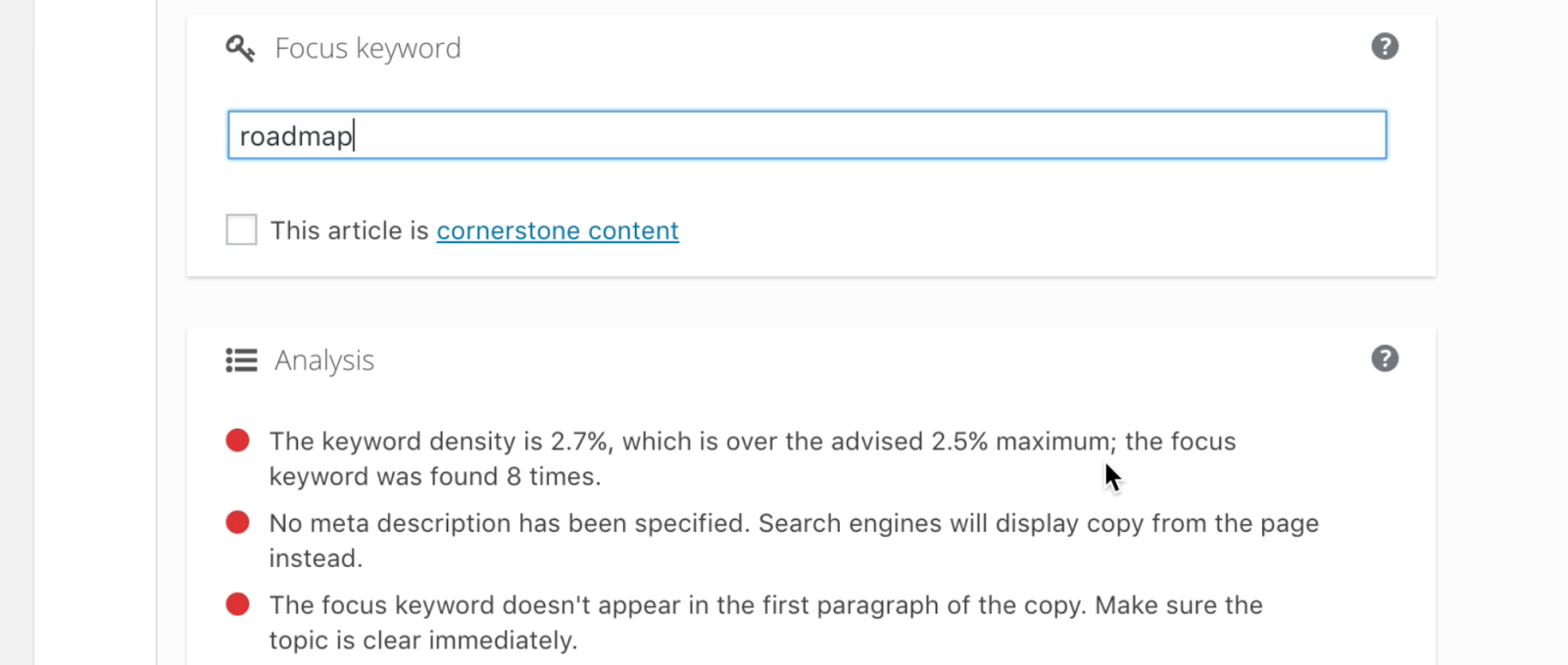
In this case, Yoast is recommending we reduce the number of times we say “roadmap” on the page. It’s also noticed that we don’t have a meta description and gives us an easy way to update it.
2. Edit Google search results copy
Yoast also provides a preview of what the page will look like in Google search results. Here we can see that “Home | Roadmap” is not a great title.
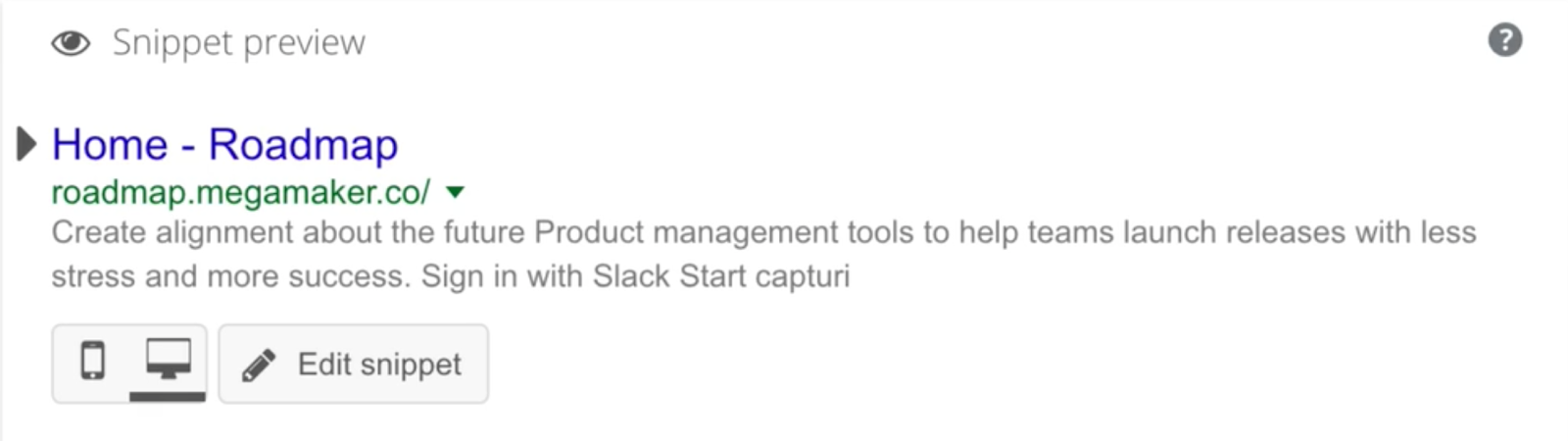
Also, because there is no meta description specified, Google displays the first lines of text on the page. In Yoast, we can define a search-friendly title and description.
3. Adjust for social
Although not specifically related to SEO, Yoast also gives us a preview of what our site would look like in social media posts. Now is a good time to make sure your feature image looks good in tweets and Facebook posts.
Creating Content
The home page is an important piece, but even more important are the landing pages and blog posts you’re going to create on your domain. Now is the time to use Answer the Public. If I type in “roadmap,” we’re going to get all the questions and propositions related to that term.
Example 1
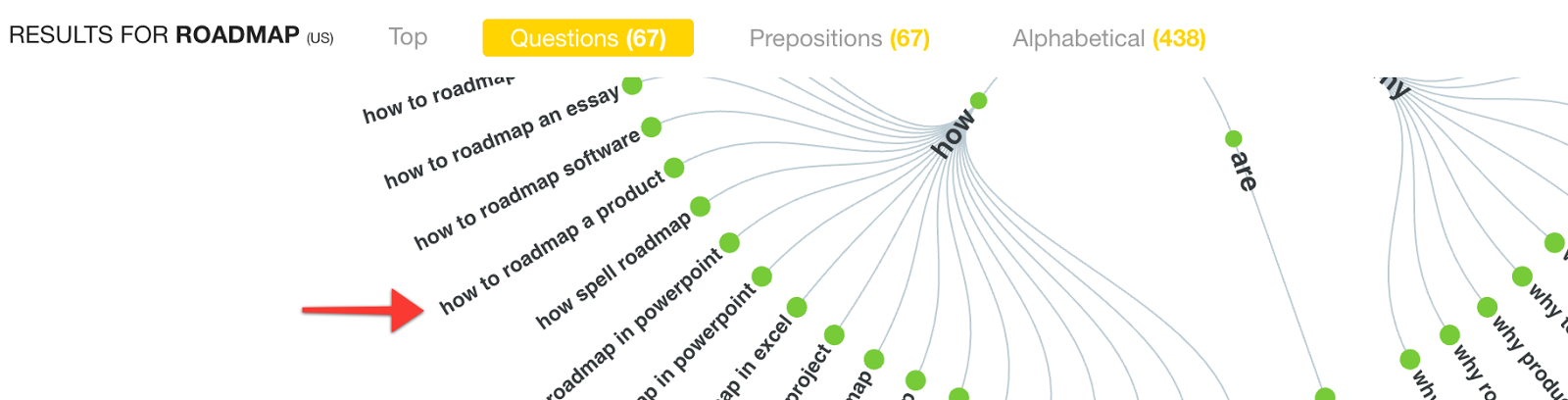
“How to roadmap a product” would make a great blog post, so I’m going to head back into WordPress and make that the title of a new blog post. Here are some things I might include in the post as I write:
- show an example of a product roadmap
- a quick list of tips for building a product roadmap
After writing, Yoast is going to help us optimize the post for search. When we type in our focus keyword, “how to roadmap product,” Yoast gives us some suggestions. For example, the focus keyword doesn’t appear in the first paragraph. That’s an easy win, so we’ll add a new section and make sure to include the keyword.
We’ll also make other changes, like editing the meta description and ensuring the post will look right on Twitter and Facebook.
Example 2
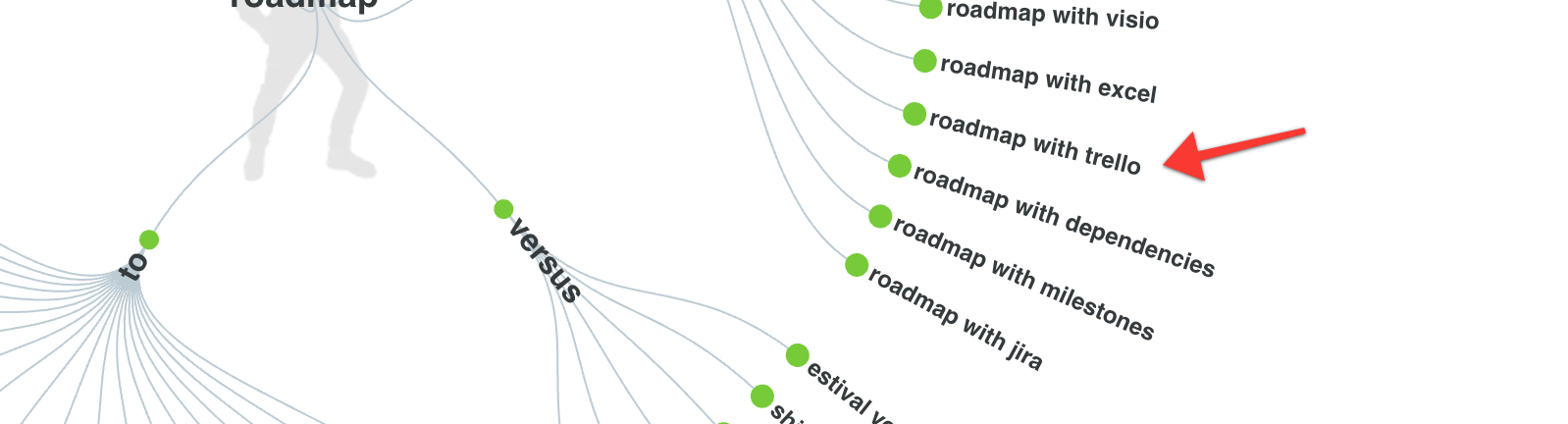
Lower down in our Answer the Public results, we find “product roadmap with Trello.” That’s another great blog post topic. In this case, I would create a blog post called “How to create a product roadmap with Trello.” I’d define my focus keyword as “Trello roadmap.”
Review
Using WordPress and Yoast together makes improving your search results feel like a game. As you write in WordPress, you’ll try to increase the SEO score that Yoast gives you.
It also gives you all the tools are in one place: readability, keyword suggestions, social media previews. Yoast will also generate a sitemap that you can submit to Google Search Console.
Buy the EPUB & PDF to read offline and support the work.
Buy the book — $10