V. After You Launch
Close the deal: ask for the sale
“Software sales” feels sleazy, doesn’t it?
We’ve all had bad experiences with salespeople.
“The salesman is the tiger, and the customer is the deer. The tiger has to eat, and you can’t eat if you don’t kill that deer. You have to go for the neck. Don’t allow him to leave. But if you try to kill him too early, the deer will wake up and run away.”
- Manny Rosales, Car Salesman1
You’re different.
You’re not selling someone else’s wares; you’re selling something you built. For you, doing the work to sell your product shouldn’t feel sleazy.
You own the whole process: you’ve found a pain and built the solution. Now, you should have the confidence to say, “People need this; I need to tell them about it.”
Good salesmanship is finding users and showing them how your app can help them. That’s it. If that’s what you’re doing, you shouldn’t feel sleazy.
This chapter covers tactics for closing the deal.2
Prioritize your leads
In the beginning, a simple spreadsheet is all you need to prioritize leads and make your first sales. Let’s say you have a list of 100 people that are interested in your product. Put them in a spreadsheet that looks like this:
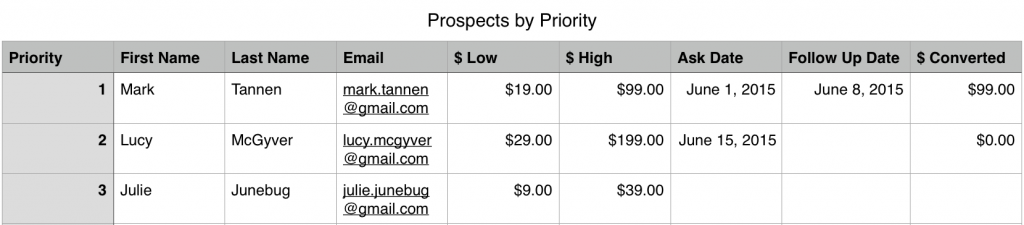
Track your prospects in a spreadsheet
Your spreadsheet should have at least nine columns:
- Priority: How likely do you think this prospect is to convert to a paying customer?
- First Name, Last Name, Email: Keep track of who prospects are. If you’re brave, you should track phone numbers too!
- $ Low: An estimate of the smallest amount they’re likely to spend.
- $ High: An estimate of the most they would spend.
- Ask Date: What day did you ask for the sale?
- Follow Up Date: What day did you follow up?
- $ Converted: How much did they end up paying? If their answer is “no thank you,” write down $0.
You objective is to force yourself to fill these all in. In the beginning, you’re not going to like it. Pitching people to buy, and then following up, doesn’t feel natural. Keep at it: when you start to see sales coming in, you might even enjoy it! Remember, you’re providing people with something of value. It’s worth helping them through the process of buying!
Ask for the money
There’s a popular internet meme that originated on Futurama3, where Bobby exclaims:
“Shut up and take my money!”
People react with excitement when they see a product they want.
The flip-side for us as product creators is this:
“All right, I’m ready to take your money.”
At some point in our marketing process, we need to ask for the sale. For most of us, this will mean sending our prospects to a page with a price and a Buy Now button.
There are three places you’ll likely have a call to action for people to buy:
- In an email
- In-product notification
- On your website
In an email
One of the last emails you’ll send a prospect in a drip sequence, email course, or launch campaign is a “buy now” email. There are a few things you’ll want to do in this email:
- Have a clear call to action: Make the link to the payment page prominent.
- Create urgency: A limited time offer can help nudge people to make a decision sooner.
- Offer a discount: Generally, 15% off is a good email offer (although this depends on your product).
Here’s how Peel4, a thin case for the iPhone, does their email:
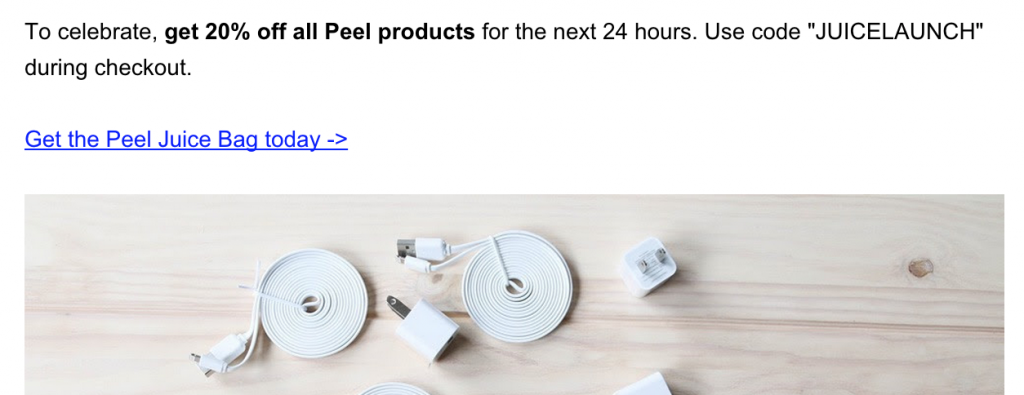
Peel uses a limited time offer to get people to buy
In-product notification
If you have a software product, using in-app notifications is another way to get people to upgrade. This has become especially common with mobile apps, which have started to leverage in-app purchases on free apps.
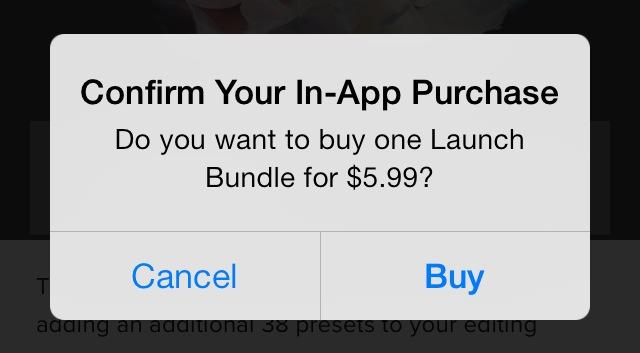
In-app purchases have a clear call to action
Marco Arment’s podcasting app, Overcast, uses this model:5
Where does the money come from? Some features are locked or limited, and there’s a single in-app purchase to unlock them all.
His app is free to use, but advanced features (like cellular downloads and variable playback speeds) are only available in the paid version.
You can also use this approach in traditional desktop software, as well as web applications. Use push notifications, banners, and disabled states to urge users to upgrade.
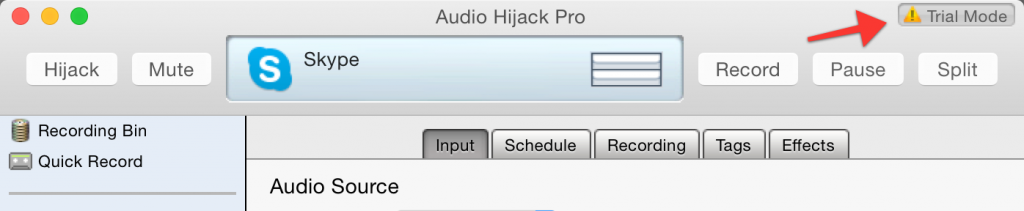
Audio Hijack Pro uses a small Trial Mode reminder
On your website
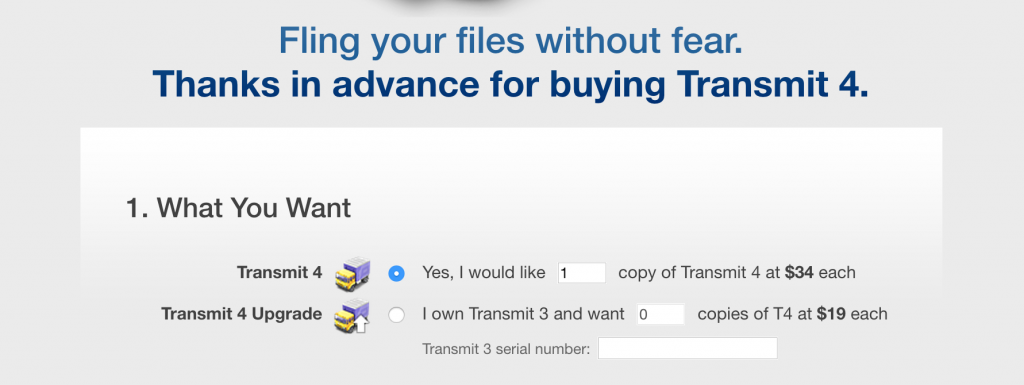
Panic.com has a well-designed “buy now” page
Make it easy
Be transparent with the user: tell them they’re currently in a trial, or using a limited version of your software. Then, provide them with the benefits they’ll get if they upgrade. Finally, give them a clear and easy way for them to give you money.
In the old days, collecting money for things you were selling online required customers to send you money in the mail. Today it should be easier. Customers should be able to conveniently pay online with credit card, PayPal, or Bitcoin.
Unfortunately, paying is often the worst part of the experience. Too many credit card forms look unprofessional. Many order forms require 3–4 different steps and 20–30 fields to complete! That’s too many. Reduce as many steps as you can.
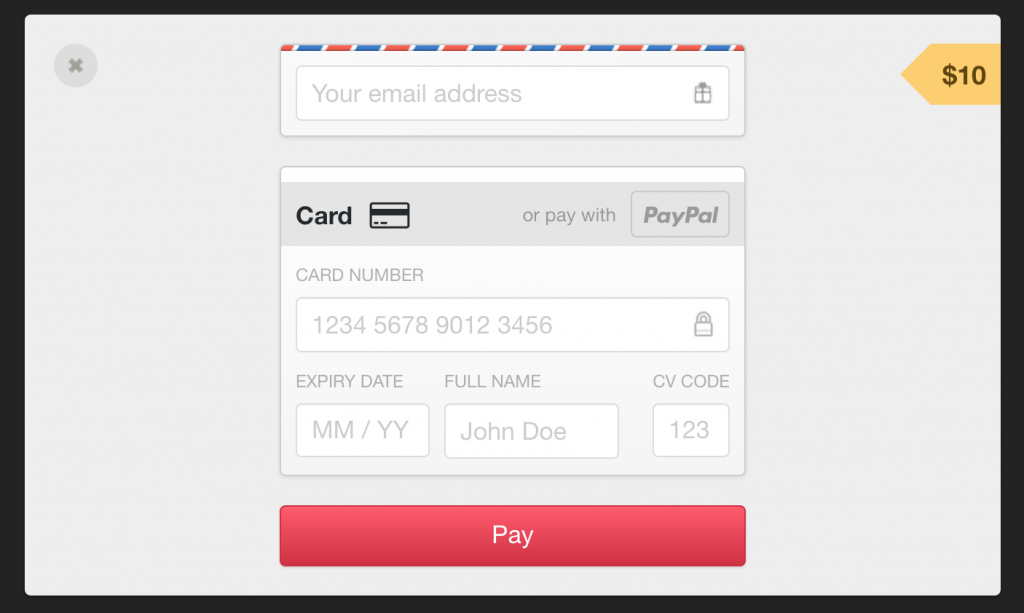
Gumroad’s payment form is one step and only has five fields
I like how Gumroad’s payment forms have one job: getting your credit card number. Everything else on the screen fades away. The form itself is well designed with large text, lots of padding in the form fields, and good defaults. No stock HTML form elements here!
Follow up
There’s one secret to increasing conversions: follow up with your leads.
Most vendors don’t do it, and it’s the most successful way to secure a sale. This tactic can be done manually or as a part of an automatic flow. Master salesperson Steli Efti describes his approach:6
I have a simple philosophy - I follow up as many times as necessary until I get a response. I don’t care what the response is as long as I get one. If someone tells me they need another 14 days to get back to me, I will put that in my calendar and ping them again in 14 days.
If they tell me they are busy, and they don’t have time right now, I will respond and ask them when they feel like a good time would be for me ping them. The key here is to actually keep following up. If someone tells me they are not interested - I leave them alone.
But here is the kicker - if they don’t respond at all, I will keep pinging them until they do.
Following up like this makes many of us feel uncomfortable. However, it’s worth doing; especially from the perspective of the customer.
Yesterday I received a phone call from the local ski resort. My family and I get a season’s pass every year, and they were calling to remind us that the early bird deal would expire in 20 days. It turns out their email system hadn’t been sending automated reminders. That phone call earned the ski resort another sale, and just as important, it kept me happy as a customer.
You’ve created an awesome solution. Be confident in asking people for their money!
Footnotes
Buy the EPUB & PDF to read offline and support the work.
Buy the book — $10